EN

1/7
Style your photo card with AI

Turn your memories into art with an AI photo card

Make your photo card with AI and bring your message to life in a whole new way. Upload your favourite photo and choose from creative AI filters - 3D Animation, Aquarelle, or Line Drawing - to transform your image into a one-of-a-kind design. Perfect for birthdays, weddings, thank-yous, or festive greetings, every AI photo card is a mix of technology and emotion, turning personal moments into artistic keepsakes. Comes with free matching white envelopes for a flawless finish.

Specifications of Style your photo card with AI

    Personalisation
  • Choose from a variety of designs, colours and fonts
  • Personalise with text and/or photo
  • High quality print to bring out the best of your photos

  • Material
  • High-quality paper (300gr) with glossy finish
  • 3 paper options: Glossy Paper, Sparkling Paper or Matte Textured Paper (not available on cards with shaped borders) available after creation

  • More info
  • Choose your preferred filter: 3D Animation, Aquarelle or Line Drawing
  • AI-generated results are created automatically and may occasionally produce unexpected outcomes. Smartphoto is not responsible for the content generated by AI filters
  • Possibility to upgrade to coloured, premium and sparkling envelopes after creation
  • (*)When you upload a photo to apply an AI effect, this image is processed by cutout.pro and/or Artificial Studio, an external AI service provider acting as an independent controller. Cutout.pro & Artificial Studio determine how your image is processed and protected.

FAQ of Style your photo card with AI

How many people can be in my picture?

When creating photo cards with AI filters, you can include as many people as you like in your picture. Just keep in mind that the more faces you add, the less precise the transformation may become.

Can I upload a picture of my pet?

Yes, try it out and you’ll see just how adorable your pet looks in their AI-transformed style!

Does a photo of any age work?

Yes! Photos at every age can be transformed beautifully. With baby pictures, the AI can make the baby look more mature or add hair, which can be a fun surprise.

What makes a photo work really well?

Bright, sharp portraits with natural light create the most magical results. A calm background helps your face pop, and eyes that are clearly visible make a huge difference. Glasses are also no issue!

Does the AI Image Studio save my AI-altered photo?

While you’re exploring the AI Image Studio, your altered images stay visible so you can browse and choose your favorite. Once you select one, it’s automatically added to the Creator, where you can continue personalizing your product.
Keep in mind that any unselected AI creations disappear once you leave the pop-up or switch to a different product or image. To make sure you don’t lose your favorite result, use it in the Creator and save your design before leaving.

Oops! My photo didn’t upload – why?

It’s likely that your file is too large. Make sure your photo is under 20 MB and no bigger than 7000 x 7000 pixels.

I made a typo, what do I do now?

Nothing worse than receiving your cards and noticing you made a typo. No worries, thanks to our smartpromise you can get a free reprint. Get in touch with our customer service and they’ll be happy to help.

🎄Order your greeting card in time to send them to your friends and family for Christmas and New Year.


  • Turn your image into a fun avatar(*) or a complete work of art
  • Choose between various designs and personalise with text and/or photo
  • Comes with preselected choices: {0} White envelope
Show More

Select orientation(Landscape)

Landscape

14,3 10 cm

From 1.80

Portrait

10 14,3 cm

From 1.80

Upload Photo
Upload Photo
Upload Photo

Delivery

  1.  
    Date
    Price
  2. 18.12.2025
    4.95
  3. 18.12.2025
    4.95
More information about all delivery options

Made a spelling mistake?

Get a free reprint

Options

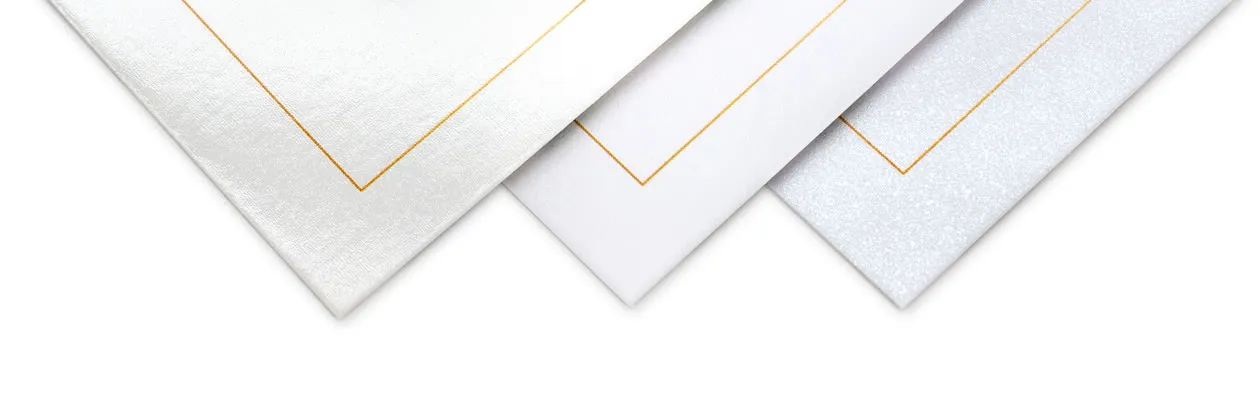
Give your Single Card a special festive look or a modern and stylish look by choosing Sparkling or Matte Textured Paper

0.50/piece

Give your Single Card a special festive look or a modern and stylish look by choosing Sparkling or Matte Textured Paper
  • Double-sided, high-quality sparkling paper 300g
  • High-quality matte textured paper 300g

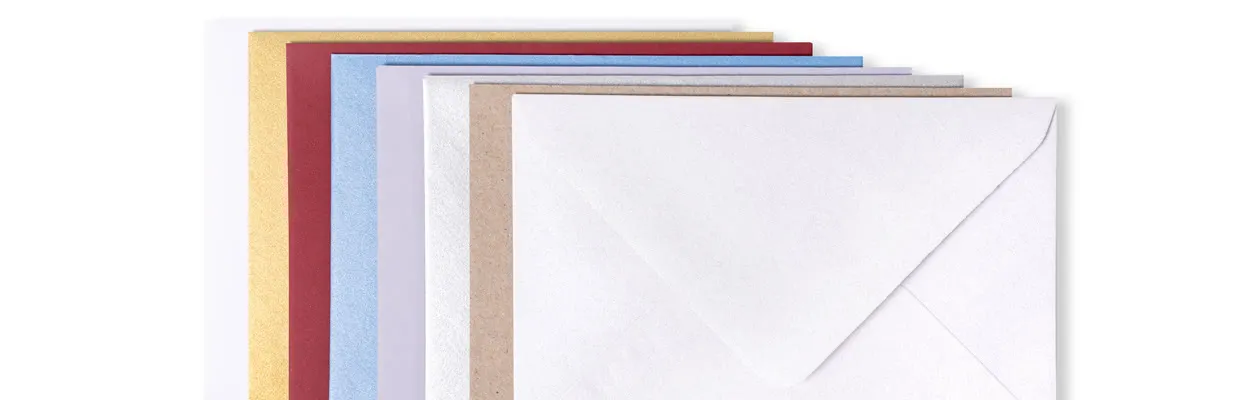
Choose to send your personalised Photo Cards in a beautiful coloured envelope

Starting at Free

Choose to send your personalised Photo Cards in a beautiful coloured envelope
Paper 120 g

  • White (preselected)
  • Dark Red
  • Lavender
  • Craft Brown

Paper 160g

  • Luxury White

Sparkling paper 120 g

  • Sparkling White
  • Sparkling Silver
  • Sparkling Gold
  • Sparkling Blue

  • Envelope closure with triangular flap

    Price information

    Quantity

    Unit price

    1 - 4

    2.35

    5 - 9

    2.05

    10 - 19

    1.80

    20 - 29

    1.60

    30+

    1.50

    Description

    Turn your memories into art with an AI photo card

    Make your photo card with AI and bring your message to life in a whole new way. Upload your favourite photo and choose from creative AI filters - 3D Animation, Aquarelle, or Line Drawing - to transform your image into a one-of-a-kind design. Perfect for birthdays, weddings, thank-yous, or festive greetings, every AI photo card is a mix of technology and emotion, turning personal moments into artistic keepsakes. Comes with free matching white envelopes for a flawless finish.

    Specifications

    Specifications of Style your photo card with AI

      Personalisation
    • Choose from a variety of designs, colours and fonts
    • Personalise with text and/or photo
    • High quality print to bring out the best of your photos

    • Material
    • High-quality paper (300gr) with glossy finish
    • 3 paper options: Glossy Paper, Sparkling Paper or Matte Textured Paper (not available on cards with shaped borders) available after creation

    • More info
    • Choose your preferred filter: 3D Animation, Aquarelle or Line Drawing
    • AI-generated results are created automatically and may occasionally produce unexpected outcomes. Smartphoto is not responsible for the content generated by AI filters
    • Possibility to upgrade to coloured, premium and sparkling envelopes after creation
    • (*)When you upload a photo to apply an AI effect, this image is processed by cutout.pro and/or Artificial Studio, an external AI service provider acting as an independent controller. Cutout.pro & Artificial Studio determine how your image is processed and protected.

    FAQ

    FAQ of Style your photo card with AI

    How many people can be in my picture?

    When creating photo cards with AI filters, you can include as many people as you like in your picture. Just keep in mind that the more faces you add, the less precise the transformation may become.

    Can I upload a picture of my pet?

    Yes, try it out and you’ll see just how adorable your pet looks in their AI-transformed style!

    Does a photo of any age work?

    Yes! Photos at every age can be transformed beautifully. With baby pictures, the AI can make the baby look more mature or add hair, which can be a fun surprise.

    What makes a photo work really well?

    Bright, sharp portraits with natural light create the most magical results. A calm background helps your face pop, and eyes that are clearly visible make a huge difference. Glasses are also no issue!

    Does the AI Image Studio save my AI-altered photo?

    While you’re exploring the AI Image Studio, your altered images stay visible so you can browse and choose your favorite. Once you select one, it’s automatically added to the Creator, where you can continue personalizing your product.
    Keep in mind that any unselected AI creations disappear once you leave the pop-up or switch to a different product or image. To make sure you don’t lose your favorite result, use it in the Creator and save your design before leaving.

    Oops! My photo didn’t upload – why?

    It’s likely that your file is too large. Make sure your photo is under 20 MB and no bigger than 7000 x 7000 pixels.

    I made a typo, what do I do now?

    Nothing worse than receiving your cards and noticing you made a typo. No worries, thanks to our smartpromise you can get a free reprint. Get in touch with our customer service and they’ll be happy to help.

    Which filters do you have?

    Bring your photos to life with our trio of creative AI filters, each offering a unique artistic twist to your images. Whether you’re going for playful, dreamy, or minimal, there’s a filter to match your style.

    3D Animation Filter
    Give your photo a playful, cinematic twist with our 3D Animation Filter. This effect transforms your image into a stylized animated portrait, mimicking the expressive charm of a high-end animated film. Facial features are gently enhanced, lighting is softened, and the entire image takes on a polished, three-dimensional look. Perfect for adding a touch of storybook magic to your picture.

    Aquarelle Filter
    Transform your photo into a dreamy watercolor painting with the Aquarelle Filter. This effect uses delicate brush strokes, soft color palettes, and subtle splashes of watercolor texture to create a painterly version of your image. The result feels both artistic and timeless, like a moment captured on canvas with gentle precision.

    Line Drawing Filter
    Minimalist and modern, the Line Drawing Filter reimagines your photo as a stylized single-line illustration. This filter simplifies the composition into continuous flowing lines, highlighting the essence of your subject with creative flair. It’s a clean, contemporary take that works beautifully for portraits and profile pictures.

    Wedding cards to love

    Are you having wedding plans? Congrats! Make sure to get some save the date cards. That way you can inform your guests on a date without figuring out all the details. When everything is sorted, it’s time to create your wedding invitations. Create a personalised wedding invitation that reflects your personalities, you can choose between one of our designs or create your own from scratch. Add the date, location and other necessary information and top off with your favourite photo(s) of the two of you. Then, on the day of the wedding you can hand out thank you cards, a customary and appreciated way to thank your guests for attending your special day. Add a beautiful photo and a heartfelt message and you’re set! Take a look at our wedding cards designs and get inspired.

    Christmas cards that stand out

    Sending Christmas cards is a tradition you have to love. The excitement of finding them in your mail with the journey of opening it and finding out who it’s from, pure joy! Spread smiles and stand out by adding this twist to your cards. Add a cute photo of your family, kids or your fur babies and enclose your festive wishes. Turn the tradition of sending your Christmas wishes into a playful and memorable experience for every recipient! Take a peak at all the different Christmas card designs and choose the one that reflects your style the best.

    Envelopes and more

    Give your cards that extra little spark with some fancy envelopes to make your cards complete. Secure your envelope with a seal sticker, add a photo or short message and you're ready to seal your envelope. Lastly, top it off with an address sticker! That way you don’t need to waste time with writing addresses numerous times. Just create a sticker with your address or the addressees and simply add them to the back of each envelope.

    Please wait...