
Technical details about photo cards with your design
Design your own photo cards – Technical guidelines
Creating your own photo card? Here you’ll find all the technical specifications you need to set up your design correctly. From bleed to trim lines and safe zones, this page explains everything clearly so your artwork prints exactly as intended. Follow the guidelines to avoid unwanted white edges or cropped text and ensure your custom photo cards look professional, sharp and perfectly finished.
More LessHere's what you need to know before you start designing
What is a bleed line, trim line and safe zone?
The safe zone (A) is the area where you should keep all text, photos and symbols so they remain fully visible once your product has been produced.
The trim line (B) shows where the product will be cut to its final size. Anything outside this line will be trimmed off, so avoid placing important details too close to it. Do not align your photo with the trim line!
The bleed line (C) marks the outer edge of your photo area. It is a narrow cutting margin (= bleed) that extends beyond the final trim line. Make sure your photos extend all the way to this line so your design is printed beautifully to the edge, without white borders. White borders may appear during printing, even if the printing machine shifts by just a few millimetres. To prevent this, your photo area extends beyond the trim line.
The trim line (B) shows where the product will be cut to its final size. Anything outside this line will be trimmed off, so avoid placing important details too close to it. Do not align your photo with the trim line!
The bleed line (C) marks the outer edge of your photo area. It is a narrow cutting margin (= bleed) that extends beyond the final trim line. Make sure your photos extend all the way to this line so your design is printed beautifully to the edge, without white borders. White borders may appear during printing, even if the printing machine shifts by just a few millimetres. To prevent this, your photo area extends beyond the trim line.
Uploaded photo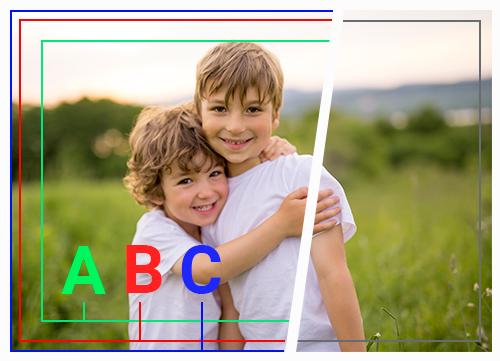 | Photo after card is cut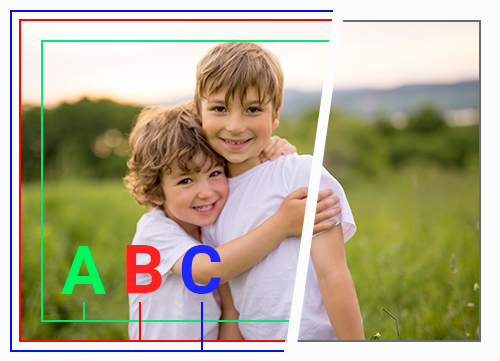 |
Supported file formats
You can upload HEIC/HEIF, JPG/JPEG and PNG files. It is not possible to upload PDF, TIFF or WEBP files in our creator.
Using a Frame
Would you like to add a frame around your photo? Place it fully within the safe zone (A), or extend it beyond the trim line (B) to the bleed line (C) if you want to create a full bleed effect.
Extra tip: Cutting is never 100% precise. So it’s best to make your frame slightly thicker. The thicker the frame, the more likely it will look perfectly symmetrical once the card has been trimmed.
Extra tip: Cutting is never 100% precise. So it’s best to make your frame slightly thicker. The thicker the frame, the more likely it will look perfectly symmetrical once the card has been trimmed.
Orange frame within the safe zone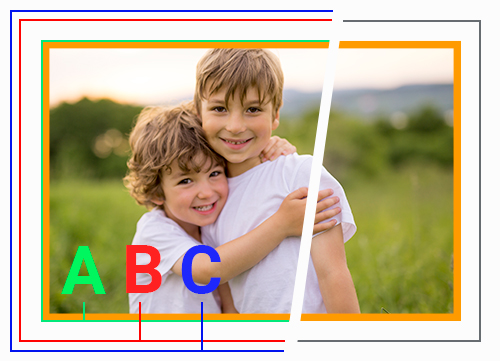 | Orange frame up to the edge of the card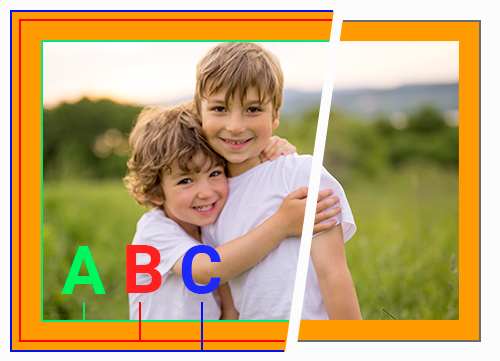 |
Automatic Image Enhancement
During production, we optimise your photos using our image enhancement technology. We automatically improve colours, contrast, brightness and skin tones so your photo looks its very best in print. Whether we apply this optimisation depends on your photo’s EXIF data:
Would you like full control? Simply switch image enhancement on or off via your profile page under "My preferences".
- Is the camera model and manufacturer listed in the EXIF information? Then we assume your photo has already been professionally edited and we will not apply any additional image enhancement.
- Have you edited your photo in Photoshop or other photo editing software? In 99% of cases, this information is automatically saved in the EXIF data. In that case, we leave your image unchanged.
- Are the camera model and manufacturer missing from the EXIF information? Then we automatically enhance your photo — provided image enhancement is enabled in your account.
Would you like full control? Simply switch image enhancement on or off via your profile page under "My preferences".
Before Image Enhancement | After Image Enhancement |
Templates
Would you like a simple overview of the dimensions needed to create your own card? Below, you’ll find the correct dimensions for each card and you can download the template. The templates are available in PDF or InDesign format.
Are you using a template? Then do not include the trim line (B), bleed line (C) or safe zone (A) in the file you upload for printing. These are only guidelines to help you while designing your card.
Single cards
Single Card Landscape & Single Card Portrait
Specification
Dimensions (mm)
File dimensions (px)
Required dimensions of photo file:
149 x 106 mm
1760 x 1252 px
Dimensions with bleed:
149 x 106 mm
1760 x 1252 px
Dimensions after cutting:
143 x 100 mm
1689 x 1181 px
Safe Zone:
137 x 94 mm
1618 x 1110 px
Bleed:
6 mm
71 px
Resolution:
300 DPI
///
Download the template of a Single Card Landscape:
Download the template of a Single Card Portrait:
Single card landscape rounded corners & Single Card Portrait rounded corners
Specification
Dimensions (mm)
File dimensions (px)
Required dimensions of photo file:
149 x 106 mm
1760 x 1252 px
Dimensions with bleed:
149 x 106 mm
1760 x 1252 px
Dimensions after cutting:
143 x 100 mm
1689 x 1181 px
Safe Zone:
137 x 94 mm
1618 x 1110 px
Bleed:
6 mm
71 px
Resolution:
300 DPI
///
Download the template of a Single card landscape rounded corners:
Download the template of a Single Card Portrait rounded corners:
Single Card Square
Specification
Dimensions (mm)
File dimensions (px)
Required dimensions of photo file:
149 x 149 mm
1760 x 1760 px
Dimensions with bleed:
149 x 149 mm
1760 x 1760 px
Dimensions after cutting:
143 x 143 mm
1689 x 1689 px
Safe Zone:
137 x 137 mm
1618 x 1618 px
Bleed:
6 mm
71 px
Resolution:
300 DPI
///
Download the template of a Single Card Square:
Single Card Square rounded corners
Specification
Dimensions (mm)
File dimensions (px)
Required dimensions of photo file:
149 x 149 mm
1760 x 1760 px
Dimensions with bleed:
149 x 149 mm
1760 x 1760 px
Dimensions after cutting:
143 x 143 mm
1689 x 1689 px
Safe Zone:
137 x 137 mm
1618 x 1618 px
Bleed:
6 mm
71 px
Resolution:
300 DPI
///
Download the template of a Single Card Square rounded corners:
Single Card Panoramic Landscape & Single Card Panoramic Portrait
Specification
Dimensions (mm)
File dimensions (px)
Required dimensions of photo file:
202 x 99 mm
2386 x 1169 px
Dimensions with bleed:
202 x 99 mm
2386 x 1169 px
Dimensions after cutting:
196 x 93 mm
2315 x 1098 px
Safe Zone:
190 x 87 mm
2244 x 1027 px
Bleed:
6 mm
71 px
Resolution:
300 DPI
///
Download the template of a Single Card Panoramic Landscape :
Download the template of a Single Card Panoramic Portrait:
Folded cards (1 fold)
Folded Card Landscape
Specification
Dimensions (mm)
File dimensions (px)
Required dimensions of photo file:
292 x 106 mm
3449 x 1252 px
Dimensions with bleed:
292 x 106 mm
3449 x 1252 px
Dimensions after cutting:
286 x 100 mm
3378 x 1181 px
Safe Zone:
280 x 94 mm
3307 x 1110 px
Bleed:
6 mm
71 px
Resolution:
300 DPI
///
Download the template of a Folded Card Landscape:
Folded Card Landscape rounded corners
Specification
Dimensions (mm)
File dimensions (px)
Required dimensions of photo file:
292 x 106 mm
3449 x 1252 px
Dimensions with bleed:
292 x 106 mm
3449 x 1252 px
Dimensions after cutting:
286 x 100 mm
3378 x 1181 px
Safe Zone:
280 x 94 mm
3307 x 1110 px
Bleed:
6 mm
71 px
Resolution:
300 DPI
///
Download the template of a Folded Card Landscape rounded corners / Folded Card Portrait rounded corners:
Folded Card Portrait
Specification
Dimensions (mm)
File dimensions (px)
Required dimensions of photo file:
206 x 149 mm
2433 x 1760 px
Dimensions with bleed:
206 x 149 mm
2433 x 1760 px
Dimensions after cutting:
200 x 143 mm
2362 x 1689 px
Safe Zone:
194 x 137 mm
2291 x 1618 px
Bleed:
6 mm
71 px
Resolution:
300 DPI
///
Download the template of a Folded Card Portrait:
Folded Card Portrait rounded corners
Specification
Dimensions (mm)
File dimensions (px)
Required dimensions of photo file:
206 x 149 mm
2433 x 1760 px
Dimensions with bleed:
206 x 149 mm
2433 x 1760 px
Dimensions after cutting:
200 x 143 mm
2362 x 1689 px
Safe Zone:
194 x 137 mm
2291 x 1618 px
Bleed:
6 mm
71 px
Resolution:
300 DPI
///
Download the template of a Folded Card Portrait rounded corners:
Folded Card Square
Specification
Dimensions (mm)
File dimensions (px)
Required dimensions of photo file:
292 x 149 mm
3449 x 1760 px
Dimensions with bleed:
292 x 149 mm
3449 x 1760 px
Dimensions after cutting:
286 x 143 mm
3378 x 1689 px
Safe Zone:
280 x 137 mm
3307 x 1618 px
Bleed:
6 mm
71 px
Resolution:
300 DPI
///
Download the template of a Folded Card Square:
Double-folded cards (2 folds)
Double Folded Card Landscape
Specification
Dimensions (mm)
File dimensions (px)
Required dimensions of photo file:
435 x 106 mm
5138 x 1252 px
Dimensions with bleed:
435 x 106 mm
5138 x 1252 px
Dimensions after cutting:
429 x 100 mm
5067 x 1181 px
Safe Zone:
423 x 94 mm
4996 x 1110 px
Bleed:
6 mm
71 px
Resolution:
300 DPI
///
Download the template of a Double Folded Card Landscape:
Double Folded Card Portrait
Specification
Dimensions (mm)
File dimensions (px)
Required dimensions of photo file:
306 x 149 mm
3614 x 1760 px
Dimensions with bleed:
306 x 149 mm
3614 x 1760 px
Dimensions after cutting:
300 x 143 mm
3543 x 1689 px
Safe Zone:
294 x 137 mm
3472 x 1618 px
Bleed:
6 mm
71 px
Resolution:
300 DPI
///
Download the template of a Double Folded Card Portrait:
Double Folded Card Square
Specification
Dimensions (mm)
File dimensions (px)
Required dimensions of photo file:
435 x 149 mm
5138 x 1760 px
Dimensions with bleed:
435 x 149 mm
5138 x 1760 px
Dimensions after cutting:
429 x 143 mm
5067 x 1689 px
Safe Zone:
423 x 137 mm
4996 x 1618 px
Bleed:
6 mm
71 px
Resolution:
300 DPI
///
Download the template of a Double Folded Card Square:
Double Folded Card Panoramic Landscape
Specification
Dimensions (mm)
File dimensions (px)
Required dimensions of photo file:
398 x 99 mm
4701 x 1169 px
Dimensions with bleed:
398 x 99 mm
4701 x 1169 px
Dimensions after cutting:
392 x 93 mm
4630 x 1098 px
Safe Zone:
386 x 87 mm
4559 x 1027 px
Bleed:
6 mm
71 px
Resolution:
300 DPI
///
Download the template of a Double Folded Card Square:
Small cards
Single Card Slim Portrait
Specification
Dimensions (mm)
File dimensions (px)
Required dimensions of photo file:
66 x 176 mm
780 x 2079 px
Dimensions with bleed:
66 x 176 mm
780 x 2079 px
Dimensions after cutting:
60 x 170 mm
709 x 2008 px
Safe Zone:
54 x 164 mm
638 x 1937 px
Bleed:
6 mm
71 px
Resolution:
300 DPI
///
Download the template of a Single Card Slim Portrait:
Gift Tags
Specification
Dimensions (mm)
File dimensions (px)
Required dimensions of photo file:
91 x 61 mm
1075 x 720 px
Dimensions with bleed:
91 x 61 mm
1075 x 720 px
Dimensions after cutting:
85 x 55 mm
1004 x 649 px
Safe Zone:
79 x 49 mm
933 x 578 px
Bleed:
6 mm
71 px
Resolution:
300 DPI
///
Download the template of a Gift Tags:
Reception Card
Specification
Dimensions (mm)
File dimensions (px)
Required dimensions of photo file:
91 x 61 mm
1075 x 720 px
Dimensions with bleed:
91 x 61 mm
1075 x 720 px
Dimensions after cutting:
85 x 55 mm
1004 x 649 px
Safe Zone:
79 x 49 mm
933 x 578 px
Bleed:
6 mm
71 px
Resolution:
300 DPI
///
Download the template of a Reception Card:
Business Cards Landscape - set of 50 & Business Cards Portrait - set of 50
Specification
Dimensions (mm)
File dimensions (px)
Required dimensions of photo file:
91 x 61 mm
1075 x 720 px
Dimensions with bleed:
91 x 61 mm
1075 x 720 px
Dimensions after cutting:
85 x 55 mm
1004 x 649 px
Safe Zone:
79 x 49 mm
933 x 578 px
Bleed:
6 mm
71 px
Resolution:
300 DPI
///
Download the template of a Business Cards Landscape - set of 50:
Download the template of a Business Cards Portrait - set of 50:
Place cards in wooden block - set of 12
Specification
Dimensions (mm)
File dimensions (px)
Required dimensions of photo file:
91 x 61 mm
1075 x 720 px
Dimensions with bleed:
91 x 61 mm
1075 x 720 px
Dimensions after cutting:
85 x 55 mm
1004 x 649 px
Safe Zone:
79 x 49 mm
933 x 578 px
Bleed:
6 mm
71 px
Resolution:
300 DPI
///
Download the template of a Place cards in wooden block - set of 12:
Cards with a special shape
Single card arched
Specification
Dimensions (mm)
File dimensions (px)
Required dimensions of photo file:
106 x 149 mm
1252 x 1760 px
Dimensions with bleed:
106 x 149 mm
1252 x 1760 px
Dimensions after cutting:
100 x 143 mm
1181 x 1689 px
Safe Zone:
94 x 137 mm
1110 x 1618 px
Bleed:
6 mm
71 px
Resolution:
300 DPI
///
Download the template of a Single card arched:
Single card with brackets landscape & Single Card with brackets Portrait
Specification
Dimensions (mm)
File dimensions (px)
Required dimensions of photo file:
149 x 106 mm
1760 x 1252 px
Dimensions with bleed:
149 x 106 mm
1760 x 1252 px
Dimensions after cutting:
143 x 100 mm
1689 x 1181 px
Safe Zone:
137 x 94 mm
1618 x 1110 px
Bleed:
6 mm
71 px
Resolution:
300 DPI
///
Download the template of a Single card with brackets landscape:
Download the template of a Single Card with brackets Portrait:
Single card double rounded horizontal & Single Card Double Rounded Vertical
Specification
Dimensions (mm)
File dimensions (px)
Required dimensions of photo file:
149 x 106 mm
1760 x 1252 px
Dimensions with bleed:
149 x 106 mm
1760 x 1252 px
Dimensions after cutting:
143 x 100 mm
1689 x 1181 px
Safe Zone:
137 x 94 mm
1618 x 1110 px
Bleed:
6 mm
71 px
Resolution:
300 DPI
///
Download the template of a Single card double rounded horizontal:
Download the template of a Single Card Double Rounded Vertical:
Single card half rounded horizontal & Single Card Half Rounded Vertical
Specification
Dimensions (mm)
File dimensions (px)
Required dimensions of photo file:
149 x 106 mm
1760 x 1252 px
Dimensions with bleed:
149 x 106 mm
1760 x 1252 px
Dimensions after cutting:
143 x 100 mm
1689 x 1181 px
Safe Zone:
137 x 94 mm
1618 x 1110 px
Bleed:
6 mm
71 px
Resolution:
300 DPI
///
Download the template of a Single card half rounded horizontal:
Download the template of a Single Card Half Rounded Vertical:
Standing card - set of 12
Specification
Dimensions (mm)
File dimensions (px)
Required dimensions of photo file:
71 x 126 mm
839 x 1488 px
Dimensions with bleed:
71 x 126 mm
839 x 1488 px
Dimensions after cutting:
65 x 120 mm
767 x 1417 px
Safe Zone:
59 x 114 mm
696 x 1346 px
Bleed:
6 mm
71 px
Resolution:
300 DPI
///
Download the template of a Standing card - set of 12: