
Personalised Macbook case for Valentine’s Day
From
52.95 0.00 52.95/piece
1/12
A personalised MacBook case, straight from the heart
This Valentine’s Day, give a gift that’s personal, practical, and made to last. A personalised MacBook case protects their laptop from scratches and bumps, while carrying a meaningful detail that reminds her of you. Add a photo, a message, or a design that tells your story together, something subtle yet full of emotion. It’s a thoughtful Valentine’s gift they'll use every day, long after the chocolates are gone.Specifications of Personalised MacBook case
- Materials & Construction
- Material: transparent polycarbonate hard shell
- Matte finish
- Two-piece snap-on design (top & bottom cover)
- Fully printable top cover surface
- Protects against scratches, falls and minor impact
- Protection for both the top and bottom of the MacBook*
- Built-in foldable cooling stand in the bottom shell
- Improved airflow during usage
- Rubberized anti-slip feet for stability
- Full access to all ports and connections without removing the case
Protection
Functionality
FAQ of Personalised MacBook case
Does my MacBook fit these cases?
This case is designed to fit multiple generations within the same MacBook size category. Due to small differences in casing shape, ventilation openings and port positioning between generations, the fit may vary slightly per model. Each case is tested for secure attachment and functional compatibility. check here the suitable MacBook models.
Where can I find the A-number of my MacBook?
On a MacBook, the A-number (also called the Model Number, formatted as Axxxx) is printed on the device itself and identifies the exact hardware model.
Here's the easiest way to find the A-number of your laptop:
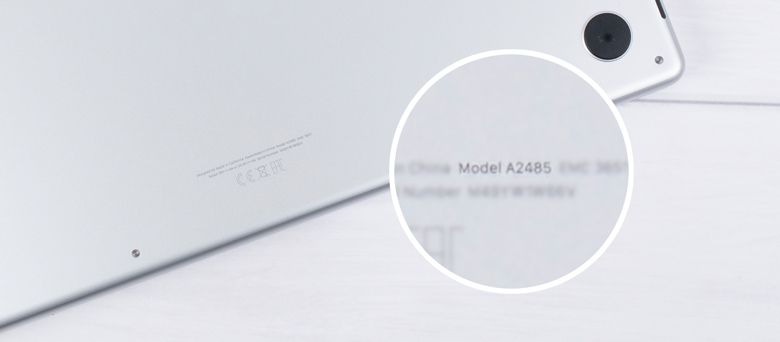
- Turn it over so the bottom case is facing up.
- Look for small text near the hinge or along the edge.
- You will see “Model Axxxx” (for example, A2337)
Why is it good to have a MacBook case?
Our quality case offers excellent protection against scratches, dents and everyday bumps while also enhancing your laptop's appearance
How do you remove a MacBook case?
Removing your MacBook case is super easy, here's how to do it properly for these hard shell cases: Start by placing your MacBook on a soft surface to prevent sliding. Open your laptop carefully and locate the corner clips that secure the case. Using a thin, sturdy item like a credit card, gently work it between the case and your MacBook at one corner. Slowly slide the card along the edge to release each clip one at a time. Work your way around the entire perimeter before lifting the case away
Does my MacBook fit these cases?
This case is designed to fit multiple generations within the same MacBook size category. Due to small differences in casing shape, ventilation openings and port positioning between generations, the fit may vary slightly per model. Each case is tested for secure attachment and functional compatibility. Find the A-number of your MacBook and check below which cover you have to choose.
Here's the easiest way to find the A-number of your laptop:

| Official Apple name | A-number | |
|---|---|---|
| MacBook Air 13″ (2022–2024) | MacBook Air (M2 / M3) | A2681, A3113, A3240 |
| MacBook Air 15″ (2023–2024) | MacBook Air 15″ (M2 / M3) | A2941, A3114, A3241 |
| MacBook Pro 14″ (2021–2023) | MacBook Pro 14″ (M1 Pro / M2 Pro) | A2442, A2779, A2918, A2992 |
| MacBook Pro 14″ (2023–2024) | MacBook Pro 14″ (M3) | A3112 |
| MacBook Pro 16″ (2021–2023) | MacBook Pro 16″ (M1 Pro / M2 Pro) | A2485, A2780, A2991 |
| MacBook Pro 16″ (2023–2024) | MacBook Pro 16″ (M3) | A3403, A3186 |
| Official Apple name | A-number | |
|---|---|---|
| MacBook Air 13″ (2022–2024) | MacBook Air (M2 / M3) | A2681, A3113, A3240 |
| MacBook Air 15″ (2023–2024) | MacBook Air 15″ (M2 / M3) | A2941, A3114, A3241 |
| MacBook Pro 14″ (2021–2023) | MacBook Pro 14″ (M1 Pro / M2 Pro) | A2442, A2779, A2918, A2992 |
| MacBook Pro 14″ (2023–2024) | MacBook Pro 14″ (M3) | A3112 |
| MacBook Pro 16″ (2021–2023) | MacBook Pro 16″ (M1 Pro / M2 Pro) | A2485, A2780, A2991 |
| MacBook Pro 16″ (2023–2024) | MacBook Pro 16″ (M3) | A3403, A3186 |
- Turn it over so the bottom case is facing up.
- Look for small text near the hinge or along the edge.
- You will see “Model Axxxx” (for example, A2337)

Personalised Macbook case for Valentine’s Day
From
52.95 0.00 52.95/piece
- Personalise your MacBook with custom text or photos – printed in vibrant, high-quality matte that never fades
- Full protection with two durable covers – shielding both sides of your laptop for maximum coverage
- Anti-slip rubber feet and integrated stand for comfortable viewing, typing and stability on any surface
- Available for latest models: check here
Product info
Select model(MacBook Air 13″ (2022–2024))
Complete the previous selections first
Go to designs
Go to designs
Complete the previous selections first
Delivery
- DatePrice
- 27.07.2026
8.95
- 28.07.2026
6.95
More information about all delivery options
Please select a product first
Made a spelling mistake?
Get a free reprint
Price information
All prices are in Swiss francs (CHF) including VAT and excluding shipping costs.
Description
A personalised MacBook case, straight from the heart
This Valentine’s Day, give a gift that’s personal, practical, and made to last. A personalised MacBook case protects their laptop from scratches and bumps, while carrying a meaningful detail that reminds her of you. Add a photo, a message, or a design that tells your story together, something subtle yet full of emotion. It’s a thoughtful Valentine’s gift they'll use every day, long after the chocolates are gone.
Specifications
Specifications of Personalised MacBook case
- Materials & Construction
- Material: transparent polycarbonate hard shell
- Matte finish
- Two-piece snap-on design (top & bottom cover)
- Fully printable top cover surface
- Protects against scratches, falls and minor impact
- Protection for both the top and bottom of the MacBook*
- Built-in foldable cooling stand in the bottom shell
- Improved airflow during usage
- Rubberized anti-slip feet for stability
- Full access to all ports and connections without removing the case
Protection
Functionality
FAQ
FAQ of Personalised MacBook case
Does my MacBook fit these cases?
This case is designed to fit multiple generations within the same MacBook size category. Due to small differences in casing shape, ventilation openings and port positioning between generations, the fit may vary slightly per model. Each case is tested for secure attachment and functional compatibility. check here the suitable MacBook models.
Where can I find the A-number of my MacBook?
On a MacBook, the A-number (also called the Model Number, formatted as Axxxx) is printed on the device itself and identifies the exact hardware model.
Here's the easiest way to find the A-number of your laptop:
- Turn it over so the bottom case is facing up.
- Look for small text near the hinge or along the edge.
- You will see “Model Axxxx” (for example, A2337)
Why is it good to have a MacBook case?
Our quality case offers excellent protection against scratches, dents and everyday bumps while also enhancing your laptop's appearance
How do you remove a MacBook case?
Removing your MacBook case is super easy, here's how to do it properly for these hard shell cases: Start by placing your MacBook on a soft surface to prevent sliding. Open your laptop carefully and locate the corner clips that secure the case. Using a thin, sturdy item like a credit card, gently work it between the case and your MacBook at one corner. Slowly slide the card along the edge to release each clip one at a time. Work your way around the entire perimeter before lifting the case away
Which size
Does my MacBook fit these cases?
This case is designed to fit multiple generations within the same MacBook size category. Due to small differences in casing shape, ventilation openings and port positioning between generations, the fit may vary slightly per model. Each case is tested for secure attachment and functional compatibility. Find the A-number of your MacBook and check below which cover you have to choose.
Here's the easiest way to find the A-number of your laptop:

| Official Apple name | A-number | |
|---|---|---|
| MacBook Air 13″ (2022–2024) | MacBook Air (M2 / M3) | A2681, A3113, A3240 |
| MacBook Air 15″ (2023–2024) | MacBook Air 15″ (M2 / M3) | A2941, A3114, A3241 |
| MacBook Pro 14″ (2021–2023) | MacBook Pro 14″ (M1 Pro / M2 Pro) | A2442, A2779, A2918, A2992 |
| MacBook Pro 14″ (2023–2024) | MacBook Pro 14″ (M3) | A3112 |
| MacBook Pro 16″ (2021–2023) | MacBook Pro 16″ (M1 Pro / M2 Pro) | A2485, A2780, A2991 |
| MacBook Pro 16″ (2023–2024) | MacBook Pro 16″ (M3) | A3403, A3186 |
| Official Apple name | A-number | |
|---|---|---|
| MacBook Air 13″ (2022–2024) | MacBook Air (M2 / M3) | A2681, A3113, A3240 |
| MacBook Air 15″ (2023–2024) | MacBook Air 15″ (M2 / M3) | A2941, A3114, A3241 |
| MacBook Pro 14″ (2021–2023) | MacBook Pro 14″ (M1 Pro / M2 Pro) | A2442, A2779, A2918, A2992 |
| MacBook Pro 14″ (2023–2024) | MacBook Pro 14″ (M3) | A3112 |
| MacBook Pro 16″ (2021–2023) | MacBook Pro 16″ (M1 Pro / M2 Pro) | A2485, A2780, A2991 |
| MacBook Pro 16″ (2023–2024) | MacBook Pro 16″ (M3) | A3403, A3186 |
- Turn it over so the bottom case is facing up.
- Look for small text near the hinge or along the edge.
- You will see “Model Axxxx” (for example, A2337)

Related products
Valentine
On Valentine's day we celebrate romance and love all over the world! On the 14th of February it's time to make your partner, husband, wife, boyfriend or girlfriend feel extra special. Show them how much you're crazy about them by getting them some of our many personalised gifts! Whether your partner is an excellent cook, is an office worker or always on the road, you will find the perfect present to surprise them with. With a gift from smartphoto, the only thing you need to add are hugs and kisses to make their Valentine's day the best day ever!